
In short
- Residential and mobile proxies on one plan at one price, with only bandwidth metered
- Unlimited IP rotation and unlimited concurrent requests, so threads and rotations are not charged separately
- Sticky sessions up to 7 days
- Crypto payments are outside the refund policy, while the 14-day money-back guarantee covers card purchases only
- Extra traffic is $5/GB on Micro and $4/GB on Basic; the advertised $2/GB is the Enterprise rate
How we scored it
- Network coverage 4.0
- 100M+ IPs across 38+ countries, by the provider's figures. That covers most regional work, but it is a short country list for global jobs.
- Plan structure 4.5
- Residential and mobile sit on one plan at one price with only bandwidth metered, so there is no separate mobile subscription to buy.
- Session and rotation controls 4.5
- Sticky sessions run to 7 days, and rotation, change-IP-by-link and collision prevention are included rather than charged as extras.
- Targeting 4.5
- Country, ISP, region and GPS coordinate filters, plus Smart Sessions that hold the same carrier and area for the life of a session.
- Pricing 3.5
- The entry plan works out at $5/GB for extra traffic and the advertised $2/GB is the Enterprise rate, though rollover softens the tiering.
- Refund terms 3.5
- The 14-day money-back guarantee covers unused data on card purchases, while the provider states crypto payments are non-refundable.
- Account and team management 4.0
- Quota control, alerting and API access are all listed, but seats stop at 2, 5 and 10 until Enterprise.
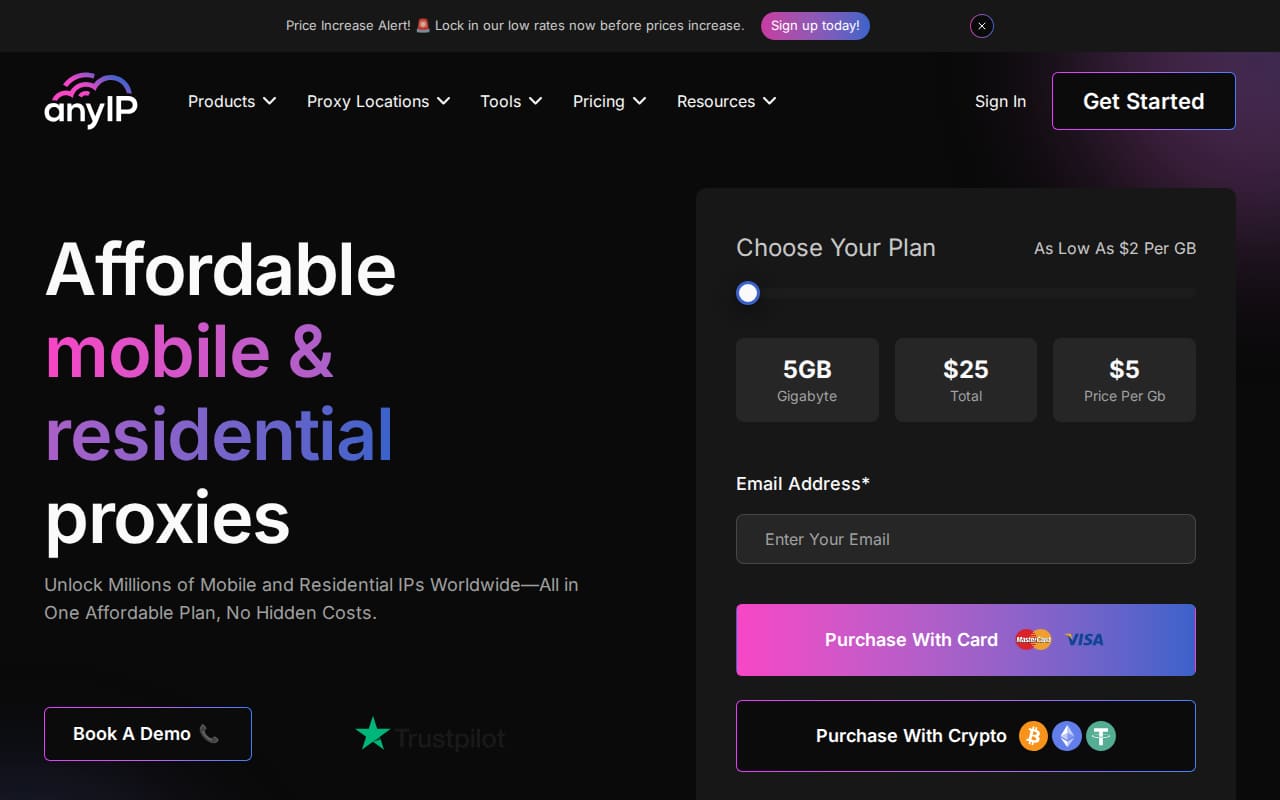
I picked AnyIP.io up because I wanted one subscription that could carry a mobile-inventory job and ordinary residential scraping without buying two products. Most providers split those into separate plans with separate bills, and I wanted to see whether a single one could hold both. A note on sourcing first: every number below that comes from AnyIP.io — the pool size, the success rate, the response time — is the provider's own claim, not something I measured.
What it is best for
AnyIP.io sells mobile and residential proxies under one plan rather than as separate purchases. The provider puts the combined pool at 100M+ IPs across 38+ countries and says 100% of them come from real devices. If your work needs carrier IPs for one task and home connections for another, that single-plan structure removes the usual question of which pool to buy first.
Targeting goes further than country level. The provider lists filtering by country, ISP, region and precise GPS coordinates, and Smart Sessions hold a session inside the same carrier and area. That is the part that matters for anything where a city-level IP is not specific enough.
- Ad verification from specific carriers and regions
- Mobile app testing against real carrier addresses
- Residential scraping at national and city level
- Multi-account work that needs long-lived sticky sessions
- Checking localised prices, stock and content across the covered markets
It is a poor fit if you want datacentre proxies or an enormous country list. AnyIP.io is mobile and residential only, and 38+ countries is a narrower footprint than the largest pools on the market.
What does AnyIP.io actually charge per gigabyte?
Answers: 4
💵 The published extra-gigabyte rate falls as the plan grows: $5/GB on Micro, $4/GB on Basic, $3/GB on Pro and $2/GB on Enterprise.
📉 The provider's home page leads with a rate of $2 per GB, which is the Enterprise extra-gigabyte rate rather than what the entry plan costs.
🧾 Included traffic scales with the tier — 5GB, 20GB, 100GB and 500GB — and unused data rolls over to the next billing cycle, so overbuying is less punishing than it looks.
💳 How you pay changes the effective cost: card purchases carry a 14-day money-back guarantee, while crypto payments are stated as definitive and not refundable.
What I liked
The plan does not meter anything except bandwidth. IP rotation is unlimited, concurrent requests are unlimited, and the number of proxies is limited only by your traffic. That is a clean way to price — no per-thread surcharge, no charge for a rotation.
Sessions are the other strong point. AnyIP.io offers sticky IPs with session durations up to 7 days, alongside rotating proxies for jobs that want a fresh IP per request. Static (sticky session) and rotating modes are both listed, so the choice is per job rather than per account.
Smaller conveniences I would normally expect to be missing are present:
- IP collision prevention, so two concurrent requests do not land on the same address
- Change proxy IP by link, which keeps rotation out of your application code
- Quota control and quota alerting, so a runaway job does not quietly eat the month
- Unused data rolls over to the next billing cycle
- No contract — month to month, pay as you go
The provider also states a ~98.6% request success rate and an average response time of ~0.6s. Treat those as marketing figures. They are single overall numbers, not broken down by country, pool or target site, which is where success rates diverge in practice.
What I didn't
The refund terms are the sharpest edge here. The 14-day money-back guarantee covers plans bought by credit card, and it applies to unused data. Pay in crypto and the provider states plainly that the payment is definitive and outside the refund policy. If you are testing the pool, pay by card.
There is no free trial in the usual sense. The provider positions the Micro plan as its trial option, paired with the money-back guarantee. I would not call that a free trial — you pay $25 up front and then argue about a refund if it does not work out.
Small plans are the expensive end of the range. Micro gives 5GB for $25, and extra traffic on that plan is $5/GB. The advertised 'as low as $2/GB' on the home page is the Enterprise extra-GB rate, not something a small buyer will see. Price per gigabyte falls as you climb, which is normal, but the gap between $5 and $2 is wide.
Team seats are capped by plan: 2 on Micro, 5 on Basic, 10 on Pro, unlimited only on Enterprise. A small agency on Basic will hit that ceiling.
Coverage is 38+ countries by the provider's own count, so check that your markets are on the list before you buy.
The products
Everything sits on the same pool and the same plan. What changes is how you consume it.
- Residential proxies — real-device IPs, billed by bandwidth
- Mobile proxies — carrier IPs from the same plan at the same price
- Static (sticky session) proxies — one IP held for up to 7 days
- Rotating proxies — a new IP per request
- Smart Sessions — keeps the IP within the same carrier and area for the life of the session
Rotation, sticky IPs and change-IP-by-link are listed as features rather than separate products, which is the right way round for anyone who does not want to buy a second plan to get a second behaviour.
How to get started
Pick a plan, pay, and the provider states that all orders are processed automatically so proxies are usable immediately after payment. There is no contract and no sales call in the flow as described.
Authentication is either username and password or an IP whitelist. For scripted work the whitelist is less friction; for anything running from rotating infrastructure, credentials are the more practical option.
API access is supported, so provisioning and management can be scripted rather than clicked through.
Integrations
AnyIP.io speaks HTTP and HTTPS, plus SOCKS5. In practice that is enough: anything that accepts a proxy URL, or a host, port, username and password, will work — browsers, headless browsers, scraping libraries, automation tools, most anti-detect browsers.
The site also has integration pages for anti-detect browsers, including AdsPower and Multilogin.
Usability
Two things stand out. Filters are granular — country, ISP, region and precise GPS coordinates — so you can target a carrier in a specific area instead of settling for a country-level address. And the session controls are exposed rather than buried: sticky durations up to 7 days, rotation on demand, and change-IP-by-link for rotation without touching your code.
Quota control and quota alerting matter more than they sound on a bandwidth-billed product, since one misconfigured loop can burn a month of traffic. Both are listed as supported.
Pricing
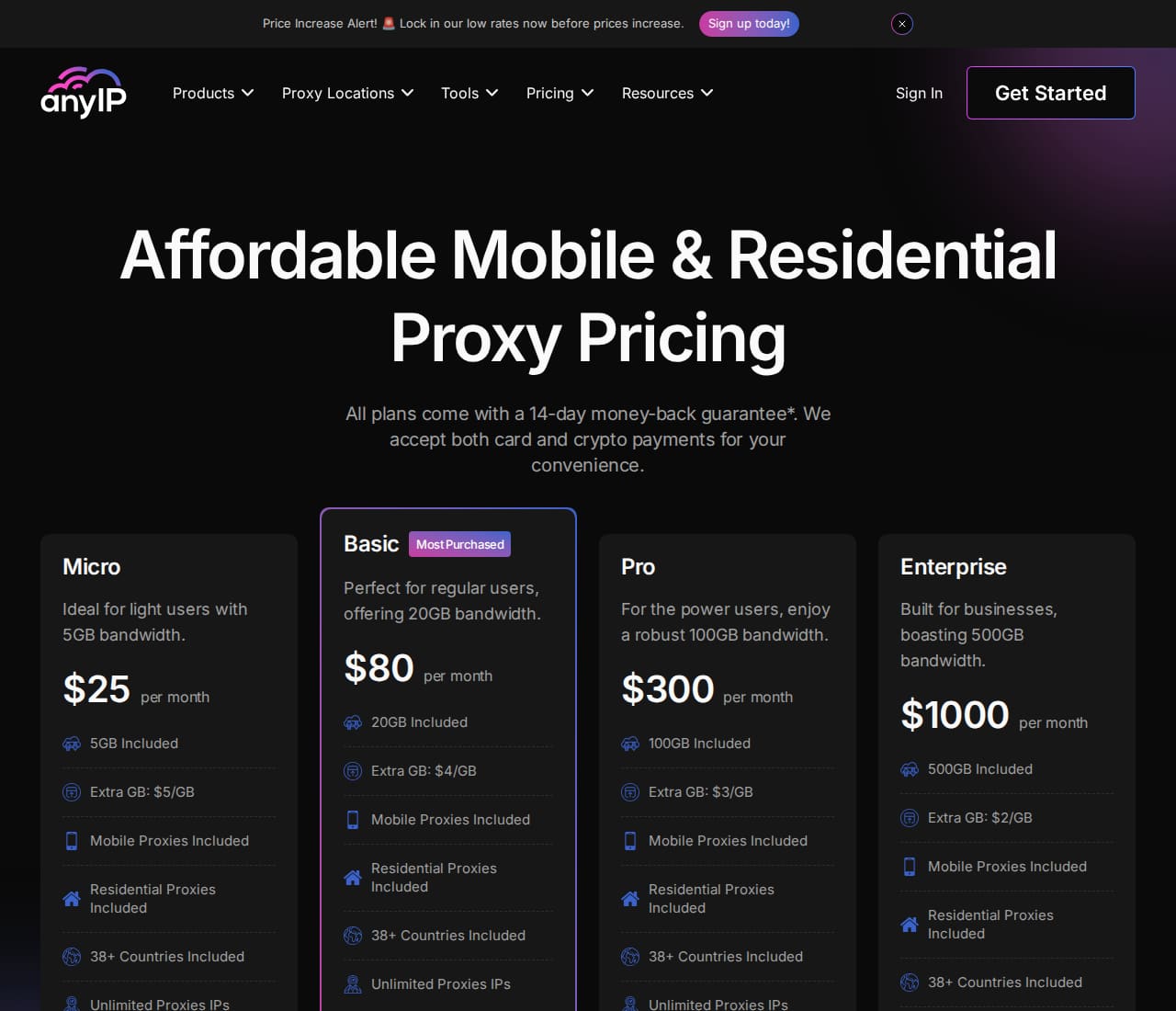
Four plans, all monthly, all covering residential and mobile at the same price:
- Micro — $25 per month, 5GB included, extra traffic $5/GB, 2 team members
- Basic — $80 per month, 20GB included, extra traffic $4/GB, 5 team members
- Pro — $300 per month, 100GB included, extra traffic $3/GB, 10 team members
- Enterprise — $1000 per month, 500GB included, extra traffic $2/GB, unlimited team members
Unused data rolls over to the next billing cycle on every plan, which softens the blow of buying a tier slightly too large — traffic you do not spend is not lost at month end.
Payment is by card, crypto or wire transfer. The 14-day money-back guarantee applies to card purchases and covers unused data; crypto is not refundable. The home page advertises pricing as low as $2/GB, which is the Enterprise extra-GB rate, so read the table rather than the headline.
Customer service
Support is 24/7 live chat, plus a contact page.
For a product where most failures are configuration rather than outages, that is worth weighing. Everything else about the service — automatic order processing, immediate access after payment, the money-back window — points to a self-service operation, and the support model matches it.
Characteristics
- Proxy types
- Mobile and residential proxies
- Residential & mobile IPs
- 100M+
- Request success rate
- ~98.6%
- Average response time
- ~0.6s
- Protocols
- HTTPS/SOCKS5
- Countries
- 38+ countries
- Pricing model
- One plan: residential & mobile proxies for all for the same price
- IP authenticity
- 100% IPs from real devices
- IP rotation
- Unlimited IP rotation
- Concurrent requests
- Unlimited concurrent requests
- Session duration
- Up to 7 Days
- Sessions
- Sticky IPs with long durations; static (sticky sessions) and rotating proxies offered
- Smart Sessions
- Keeps your IP within the same carrier and area
- Proxies per plan
- Unlimited proxies IPs (limited by bandwidth)
- IP collision prevention
- Supported
- Change proxy IP by link
- Supported
- Authentication
- Username/Password and IP Whitelist
- Filtering
- Country, ISP, Regions, Precise GPS Coordinates
- Team members
- Micro: 2; Basic: 5; Pro: 10; Enterprise: Unlimited
- Quota control
- Supported
- Quota alerting
- Supported
- API access
- Supported
- Unused data rollover
- Your unused data rolls over to the next billing cycle
- Contract
- No contract; pay as you go, month to month
- Order processing
- All orders are processed automatically; use proxies immediately after payment
- Customer support
- Live chat support 24/7
figure published by the provider, not measured by us.
Price table
Scroll the table sideways to see every column.
| Billing | Plan | Traffic | Price | Per GB |
|---|---|---|---|---|
| per month | Micro | 5GB Included | $25 | Extra GB: $5/GB |
| per month | Basic | 20GB Included | $80 | Extra GB: $4/GB |
| per month | Pro | 100GB Included | $300 | Extra GB: $3/GB |
| per month | Enterprise | 500GB Included | $1000 | Extra GB: $2/GB |
Prices as recorded on Oct 16, 2026 · All plans come with a 14-day money-back guarantee. Card and crypto payments accepted. Extra GB prices per plan; home page states pricing as low as $2 per GB.
Published figures
- Residential & Mobile IPs
- 100M+
- Request Success Rate
- ~98.6%
- Average Response Time
- ~0.6s
These figures are published by the provider or by third-party listings , recorded on Oct 16, 2026 . — not measurements of ours. We have not run independent tests against this provider; see our methodology.
What stood out
In its favour
- Residential and mobile proxies on one plan at one price, with only bandwidth metered
- Unlimited IP rotation and unlimited concurrent requests, so threads and rotations are not charged separately
- Sticky sessions up to 7 days
- Filtering by country, ISP, region and precise GPS coordinates
- Smart Sessions keep the IP inside the same carrier and area
- IP collision prevention and change-IP-by-link are included
- Unused data rolls over to the next billing cycle on every plan
- Quota control, quota alerting and API access
- No contract, month to month, and orders are processed automatically
- 24/7 live chat as the support channel
Against it
- Crypto payments are outside the refund policy, while the 14-day money-back guarantee covers card purchases only
- Extra traffic is $5/GB on Micro and $4/GB on Basic; the advertised $2/GB is the Enterprise rate
- 38+ countries is a short list for global work
- Team seats are capped at 2, 5 and 10 before Enterprise
- There is no free trial — the Micro plan is the trial option and it is paid up front
Our verdict
AnyIP.io is a reasonable pick if you want carrier and residential IPs from one subscription and you would rather pay for bandwidth than for threads or rotations. The session controls and the targeting filters are the parts worth paying for. It is a harder sell if cost per gigabyte is your main metric, if you intend to pay in crypto and still want refund protection, or if you need a very wide country list — 38+ countries is the provider's own figure and it is not the biggest. Every performance number quoted here is AnyIP.io's claim, not a benchmark I ran.
Try AnyIP.ioWould you recommend AnyIP.io?
Readers who have used it — one tap, no sign-up.
Thanks — your answer is counted below.
% of would recommend it · / 5
Questions about AnyIP.io
Do I have to buy mobile and residential proxies separately?
No. AnyIP.io sells both under one plan at the same price, and your spend is metered by bandwidth rather than by proxy type.
Is there a free trial?
No. The provider positions the Micro plan as its trial option, backed by the 14-day money-back guarantee.
Can I get a refund if I pay in crypto?
No. The 14-day money-back guarantee applies to plans bought with a credit card and covers unused data; crypto payments are stated as definitive and are not subject to the refund policy.
How many countries are covered?
38+ countries, according to the provider.
Which protocols are supported?
HTTP/HTTPS and SOCKS5.
Does unused traffic expire at the end of the month?
No. Unused data rolls over to the next billing cycle on every plan.
Ask a question about AnyIP.io
No sign-up. We answer the ones that come up most.
Other reviews
Links to AnyIP.io on this page are affiliate links: if you buy through them we may earn a commission, at no cost to you. It does not change what we write — see our monetisation policy. Looking for free proxies instead? Our free list and proxy checker are free to use.